Post-Quote Intelligence for ServiceM8 users
Know which quote needs your next call.
You’ve done the site visit. You’ve priced the work. Don’t waste the next conversation asking, “Did you get my quote?”
Zevik brings quote engagement, audio and video activity, client questions and responses together — so you can see what needs attention and go into the conversation prepared.
Keep quoting in ServiceM8. Add a client-ready quote experience, automated SMS follow-up when you turn it on, and Post-Quote Intelligence to help you decide who to call, what to address and where to focus next.
Your ServiceM8 workflow. More context for your next move.
Illustrative scenario.
Clarify the removal scope, then ask what else they need to make a decision.
You have time for three calls. Which quotes get them?
An open quote is work you’ve already invested in. Your next move deserves more than a generic reminder.
What Zevik adds to your ServiceM8 quote workflow
Show the work behind the price
Give clients a branded, mobile-friendly quote page with the scope, an audio explanation, an optional introduction video and clear ways to ask a question or approve. Keep your explanation working after the site visit ends.
Bring the signals into one view
See recorded quote-page visits, audio plays, video activity, questions, responses and SMS follow-up activity together. Get the context for your next conversation.
Turn activity into a next action
Zevik’s Post-Quote Intelligence interprets engagement and client responses to surface recommended next actions. See what needs attention and the evidence behind the recommendation — in Zevik, and in the ServiceM8 job diary.
Put your attention where it counts
Use engagement, quote status and client responses to prioritise your open Zevik quotes. Give the conversations that need you a place in today’s work.
Keep follow-up moving
Automated SMS reminders support consistent contractor quote follow-up when you turn them on in your Zevik settings. Review the messages and client activity alongside the quote, then step into the conversation with context.
How Zevik works with ServiceM8
Create your quote in ServiceM8
Keep ServiceM8 as your quoting and job management system.
Choose Send with Zevik
With the Zevik add-on connected, open the ServiceM8 job and select More → Send with Zevik to prepare the client quote experience.
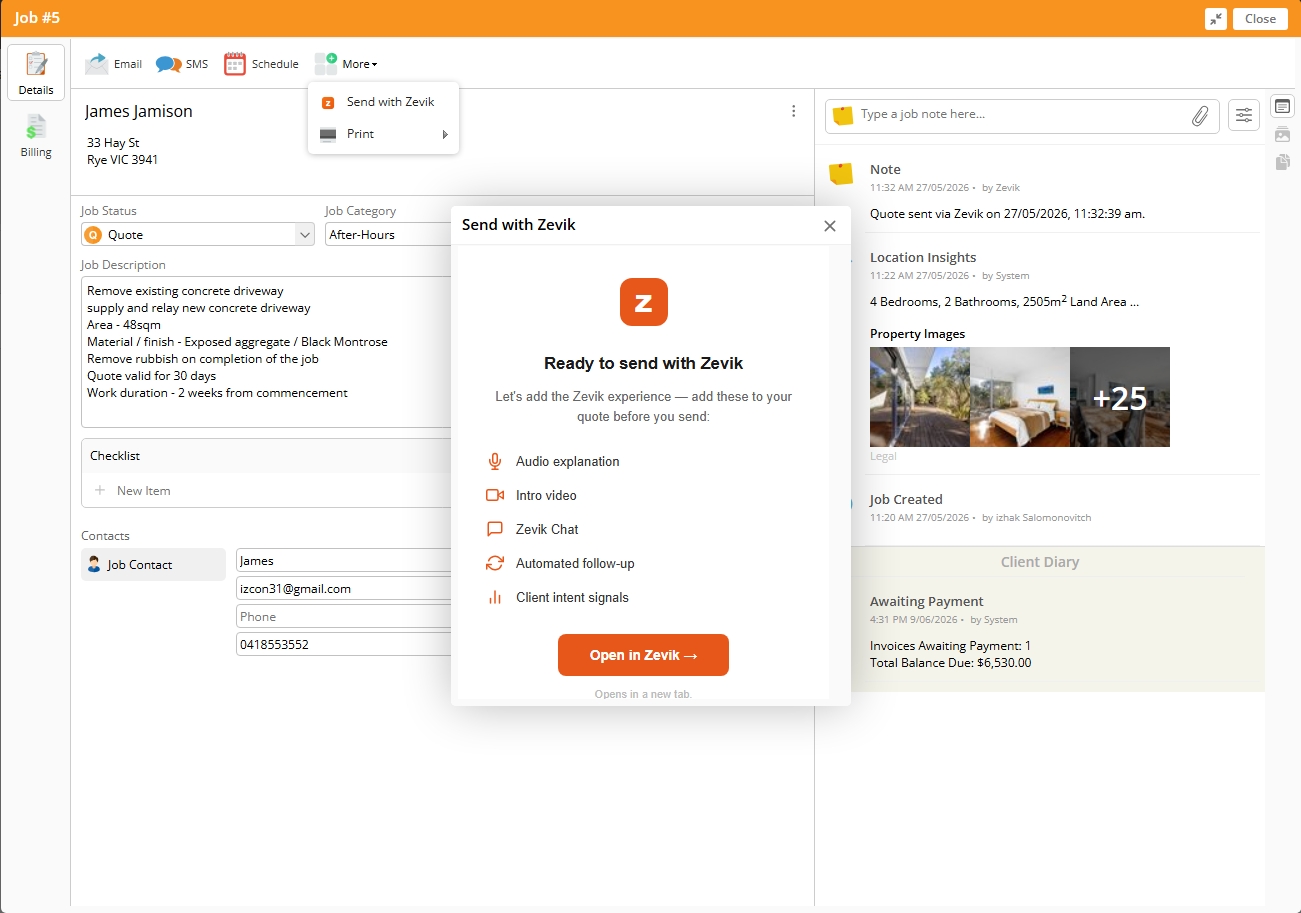
Send with Zevik from the ServiceM8 job.
Give the client a clear way to respond
The client can review the quote, play its audio explanation, watch your introduction video when included, ask a question and approve through Zevik.
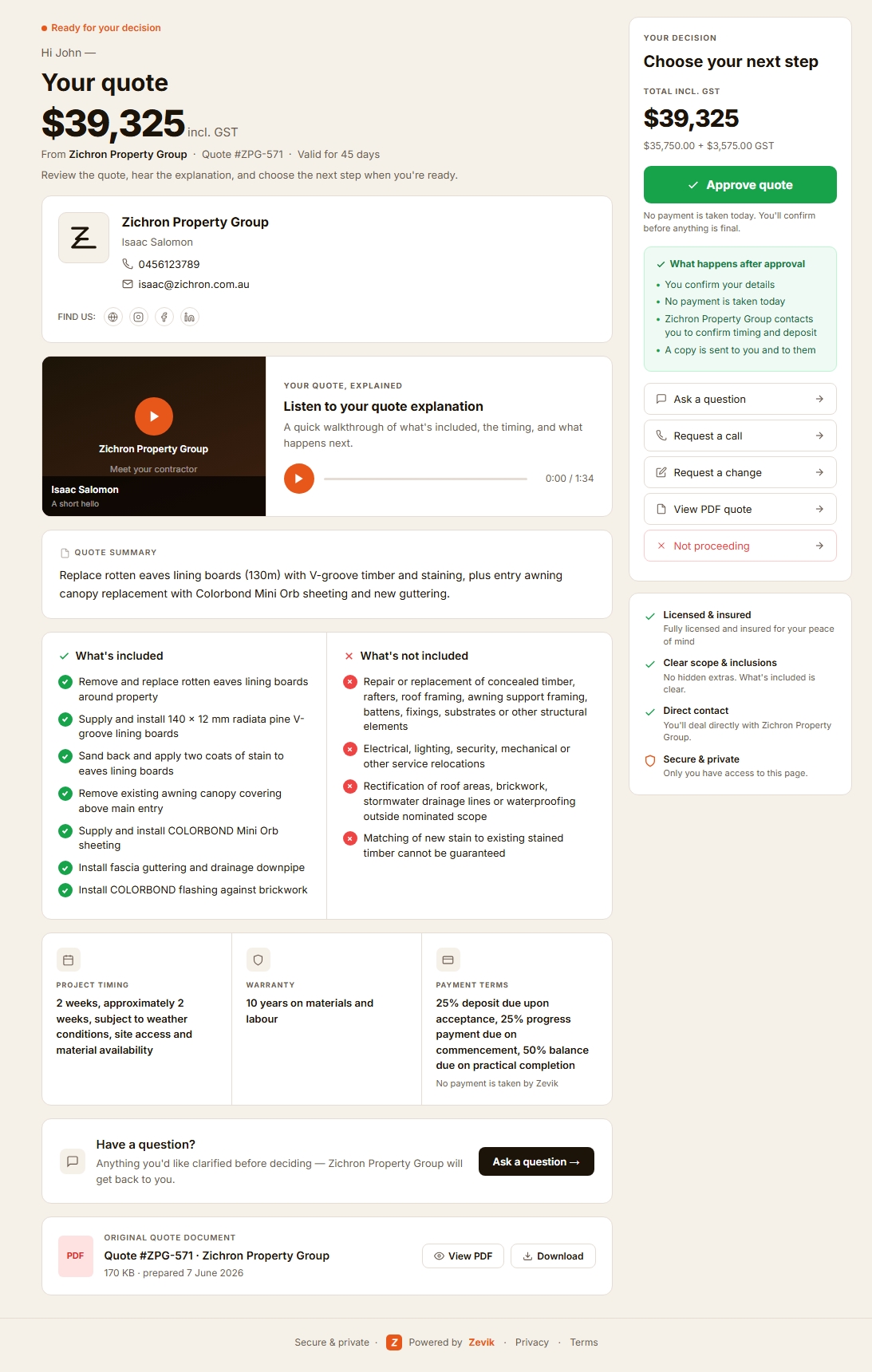
The Zevik client quote experience.
See what needs your attention
Review engagement, questions, responses and SMS follow-up activity. Use Zevik’s recommendations to choose your next action.
- A recommended next action on the quote, with the activity it rests on
- Quote-page visits, explanation plays, questions, responses and SMS follow-up in one timeline
- Zevik’s recommended next step in the ServiceM8 job diary
Connect the decision to the job
Zevik sends the client’s approval back to ServiceM8. A successful sync records it against the job.
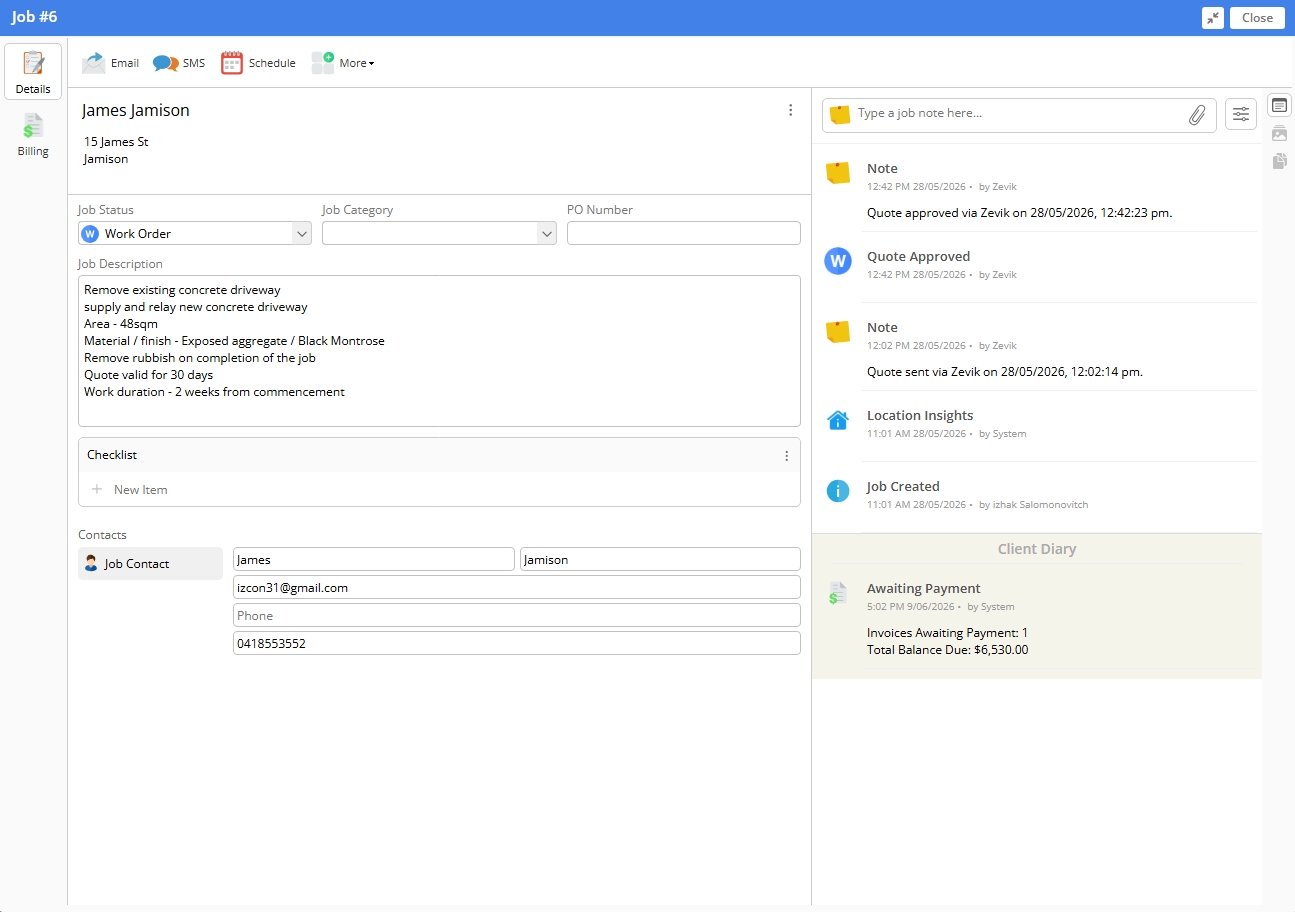
Example of a successfully synced Zevik approval in ServiceM8.
ServiceM8 quote tracking and follow-up: where Zevik fits
ServiceM8 provides online Proposals, proposal-view information and automated email and SMS quote follow-up. Zevik builds alongside that workflow, combining its client quote experience with engagement interpretation, prioritisation and recommended next actions.
| Capability | ServiceM8 provides | Zevik adds alongside it |
|---|---|---|
| Quoting and job management | Quoting, scheduling, job management and invoicing. | A connected client experience after sending the quote. |
| Online proposals | Online Proposals with rich content and client acceptance. | A Zevik quote page with audio explanation, response options and engagement evidence. |
| Proposal-view information | Proposal link-view information, view count and last-viewed time. | Zevik page activity alongside audio and video engagement, questions and responses. |
| Quote follow-up | Automated email and SMS quote follow-up through the Automation Add-on. | Automated SMS follow-up within the Zevik quote and engagement workflow, switched on in your Zevik settings. |
| Attention and next steps | The capabilities above remain part of your ServiceM8 workflow. | Interpretation and prioritisation across your Zevik quotes, with recommended next actions. |
ServiceM8 references: Proposal features and tracking and quote follow-up automation.
What is Post-Quote Intelligence?
Post-Quote Intelligence brings together client engagement, explanation activity, questions and responses after a quote is sent. It turns that evidence into an assessment, a priority and a recommended next action.
Zevik applies it to quotes sent through its client experience — helping you decide which opportunity needs attention and how to follow through.
Read about Post-Quote Intelligence →ServiceM8 and Zevik questions
Make your next quote conversation count
You’ve earned the enquiry. You’ve priced the work. Give the client a clear way forward — and give yourself the context to follow through.
Keep ServiceM8. Add Zevik. Know where to focus next.